

“Dealmagnet.uk is a participant in the Amazon EU Associates Programme, an affiliate advertising programme designed to provide a means for sites to earn advertising fees by advertising and linking to Amazon.co.uk.”
A gaming desk is more than just furniture — it’s the foundation of your gaming experience. Whether you’re a professional streamer, competitive gamer, or casual player, the right desk setup can dramatically enhance comfort, focus, and performance.
Choosing the right gaming desk isn’t only about looks or size; it’s about ergonomics, durability, organization, and immersion. This guide will walk you through every factor you should consider before buying, based on research, user feedback, and expert insights from gamers who’ve optimized their setups for long hours of play.
🧠 What to Consider Before Buying a Gaming Desk
Before diving into specs and materials, take a moment to understand your gaming habits and setup. Here’s what truly matters:
1. Desk Size and Available Space
Your available room space determines the maximum desk size you can fit.
- Small rooms: Consider compact or corner desks to maximize space.
- Medium spaces: A rectangular desk with cable holes and monitor risers fits perfectly.
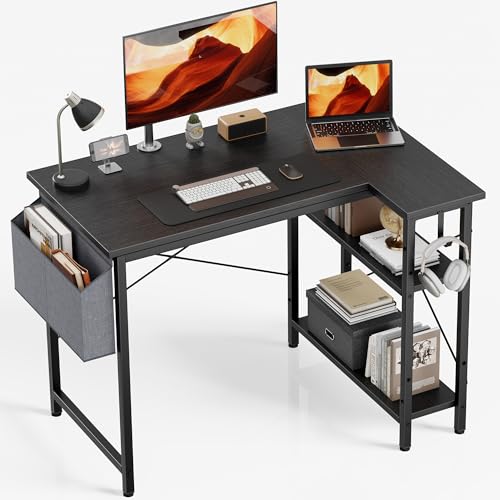
- Large setups: An L-shaped or U-shaped desk provides flexibility for multiple monitors or consoles.
🟢 Pro Tip: Measure both your monitor width and legroom space before buying — poor measurement is one of the most common buyer regrets.
2. Ergonomics and Comfort
Long gaming sessions demand proper ergonomics. The desk should:
- Align with your chair height and monitor eye level.
- Allow enough space for your keyboard, mouse pad, and wrist rest.
- Support a neutral posture to reduce neck or wrist strain.
🪑 Expert Insight: Ergonomically designed desks reduce fatigue and improve reaction times during extended gameplay.
3. Material and Build Quality
Gaming desks come in various materials, each with pros and cons:
| Material Type | Durability | Appearance | Maintenance | Price Range |
|---|---|---|---|---|
| MDF (Medium-Density Fiberboard) | Moderate | Sleek finish | Easy to clean | Budget-friendly |
| Solid Wood | Excellent | Premium look | Requires care | Expensive |
| Metal Frame + Wood Top | High | Modern | Very durable | Mid to high |
| Glass Top | Moderate | Stylish | Requires frequent cleaning | Mid-range |
🟢 Recommendation: Go for metal frames with a laminated top for the best balance between stability and cost.
4. Weight Capacity
Gamers with multiple monitors, heavy PCs, and accessories must check load capacity.
- Basic desks handle around 100–150 lbs.
- Heavy-duty desks can support 200 lbs or more.
Ensure the desk doesn’t wobble under full setup weight — a shaky desk can ruin immersion and even damage your gear.
5. Cable Management
Nothing ruins a beautiful setup like tangled cables.
Look for desks with:
- Built-in grommets or holes for cables
- Under-desk trays or power strip mounts
- Rear cable management covers
🧩 Organized cables = cleaner look + better airflow + easier cleaning.
6. Aesthetic & Lighting Features
Gaming desks now go beyond function — they enhance your visual atmosphere.
- RGB lighting adds immersion and energy.
- Carbon-fiber textures give a modern, gaming-centric look.
- Curved edges prevent wrist and elbow strain.
🎮 Tip: Choose lighting modes that match your gaming room ambiance — soft blue for calm, red for intensity.
7. Storage Options
For gamers with multiple accessories, consider desks with:
- Drawer units for controllers, cables, or manuals.
- Headset hooks and cup holders.
- Monitor stands for better posture and space use.
8. Ease of Assembly
Even a premium desk can frustrate you if it’s hard to assemble.
Look for:
- Pre-drilled holes
- Clear instructions
- Required tools included
Average setup time: 30–90 minutes, depending on size and features.
🕹️ Types of Gaming Desks
Different gamers need different desk types. Let’s explore the most common ones:
1. Standard Rectangular Desks
- Ideal for single monitor setups.
- Simple, affordable, and space-efficient.
Best for: Beginners and minimalists.
2. L-Shaped Desks
- Fits in corners, maximizing space.
- Perfect for dual-monitor or streaming setups.
Best for: Gamers needing multitasking space.
3. U-Shaped Desks
- Surrounds you with gear access from all sides.
- Great for simulation or racing gamers.
Best for: Professional streamers.
4. Height-Adjustable Desks
- Electric or manual lift systems.
- Switch between sitting and standing.
Best for: Health-conscious gamers.
5. Compact Desks
- Small footprint, foldable options.
Best for: Apartments or dorm setups.
⚖️ Pros & Cons Summary
| Desk Type | Pros | Cons |
|---|---|---|
| Rectangular | Simple, affordable, fits anywhere | Limited space for add-ons |
| L-Shaped | More surface area, great for corner rooms | Harder to move |
| U-Shaped | Immersive, massive workspace | Requires large room |
| Adjustable | Health-friendly, ergonomic | Costly, mechanical parts may fail |
| Compact | Budget and space saver | Limited surface area |
🧩 Features to Look for in a Gaming Desk
✅ Must-Have Features
- Cable management tray
- Headphone hook
- Cup holder
- Non-slip surface
- Height adjustability
⚙️ Optional But Useful
- RGB lighting zones
- Wireless charging pad
- USB power hubs
- Integrated monitor riser
💡 Real-Life Insights & Expert Opinions
Many experienced gamers emphasize comfort and build stability over flashy features.
- Ergonomics > RGB lights.
- Stability > aesthetic design.
- Functionality > size.
An average gamer spends 3–6 hours daily at their desk. Investing in a durable, ergonomic desk not only enhances gameplay but prevents physical strain.
Expert Opinion:
“A good gaming desk should feel invisible — you shouldn’t notice it while gaming. If you do, it’s not doing its job.”
— Professional Esports Coach
🧠 Who It’s Best For
| User Type | Recommended Desk Type | Key Benefit |
|---|---|---|
| Beginner Gamer | Rectangular / Compact | Simple setup |
| Streamer | L-Shaped / Adjustable | Space for gear |
| Esports Player | Adjustable / U-Shaped | Ergonomic posture |
| Student Gamer | Compact / Foldable | Budget-friendly |
| Designer + Gamer | L-Shaped / Wide Desk | Dual-use workspace |
🛠️ Setup Tips for the Best Gaming Experience
- Place monitor at eye level (no neck tilt).
- Keep keyboard + mouse centered with your shoulders.
- Use RGB ambient lights to reduce eye strain.
- Maintain cable order with clips or sleeves.
- Keep your chair height balanced with desk level.
🟢 Pro Setup Tip: Leave 4–6 inches between wall and desk for cable flexibility.
🔍 FAQ – Common Buyer Questions
Q1. Should I choose a gaming desk or a regular office desk?
A gaming desk offers better cable management, aesthetics, and accessories designed for gaming comfort.
Q2. What size desk is ideal for two monitors?
At least 55–60 inches wide for comfort and spacing.
Q3. Are glass-top desks good for gaming?
They look great but can be slippery and fragile.
Q4. How long does a quality gaming desk last?
With care, 5–10 years depending on material and load.
Q5. Should I go for an adjustable-height desk?
Yes, if you spend long hours gaming or working — it promotes better posture.
🧾 Final Recommendation
When buying a gaming desk, prioritize ergonomics, build strength, and space efficiency over just design or RGB lights.
The ideal gaming desk is one that:
- Fits your available space
- Supports your entire setup
- Keeps you comfortable for hours
- Offers easy cable organization
🟢 If it enhances comfort and improves focus, it’s the right desk for you.
🧮 Summary Table: Quick Comparison
| Category | Best For | Key Features | Budget Range |
|---|---|---|---|
| Compact Desk | Small rooms | Foldable, minimal setup | $ |
| Standard Desk | Everyday gaming | Durable, simple design | $$ |
| L-Shaped Desk | Multi-monitor users | Corner-friendly, spacious | $$$ |
| Adjustable Desk | Health-conscious gamers | Standing support, electric lift | $$$ |
| U-Shaped Desk | Streamers | Immersive design | $$$$ |
💬 Conclusion
A gaming desk is an investment in performance and comfort. The right one transforms your play area into a focused, clutter-free, and ergonomic gaming environment. Whether you’re into competitive play or just late-night sessions, a proper desk supports both your posture and passion.
So before you click “add to cart,” take time to measure, compare, and prioritize.
Because your gaming experience deserves a setup built for champions.ming your favorite shows, the right smart tablet will keep you connected and creative — smartly.ool that enhances how you learn, create, and connect.
Latest Posts
- Everyday Essentials Buying Guide: Make Smart Choices for Daily LivingOvshnrr Foot Rest Under Desk Ergonomic Foot Rest 4 Level Height Adjustable Folding Footstool Non-Slip Foot Leg Rest with Massage Function Soft Pads Max Load 120 Pounds for Car Office Home Gaming Mitclear Window Cleaning Kit with Extension Poles(77IN), Window Cleaner Tool with 14’’ Silicone Squeegee & Microfiber Scrubber, Professional Window Washing Equipment for Shower… Read more: Everyday Essentials Buying Guide: Make Smart Choices for Daily Living
- Everyday Essentials Buying Guide: Make Smart Choices for Daily LivingUltenic Robot Vacuum Cleaner with Mop 8000Pa/200Mins, Precision LiDAR Navigation, 3 in 1 Sweep & Mop Robot,5 Maps, No-go Zone, App Control for All Floor, Carpet & Pet Hair Mitclear Professional Window Cleaning Kit 10IN, Window Cleaner Tool with Silicone Squeegee, Microfiber Scrubber & Cloth, Household Cleaning Equipment for Shower Glass Mirror Door Car, Indoor/Outdoor… Read more: Everyday Essentials Buying Guide: Make Smart Choices for Daily Living
- Smart Choices: Your Complete Buying Guide for Good Smart TabletsPOWSTR 120cm Workbench On Wheels,Foldable Workbench With 500KG Load Capacity,5-Level Height Adjustment,Wooden Workbench Suitable for Garages,Offices,and Homes POWSTR Adjustable Workbench with 360° Lockable Wheels, 32″-42″ Height-Adjustable Work Table with Six-Level Settings,Suitable for Garages, Workshops, Offices and Home Septekon Security Camera Outdoor, CCTV Camera, 2K Dual Antenna WiFi Home Surveillance Cameras with IP66 Waterproof, Night Vision,… Read more: Smart Choices: Your Complete Buying Guide for Good Smart Tablets
- Smart Choices: Your Complete Buying Guide for Good Smart TabletsDOOGEE T30S Android 15 Tablet 11 Inch Tablets 2.4K Tablets with Sim Card Slot, 16GB RAM+256GB ROM TF1TB T606 Octa-Core, 8580 mAh 8MP+13MP 3.5mm, 5G WIFI, Bluetooth 5.0 Android Gaming Tablet – Black DOOGEE Tab E3+ Android 15 Tablets 12 Inch Android, FHD+Tablet With SIM Card Slot, Helio G100 Octa-Core AI Tablets, 90 Hz Gaming… Read more: Smart Choices: Your Complete Buying Guide for Good Smart Tablets
- Sleep Better with Top Memory Foam Mattresses – –
 A good night’s sleep starts with the right mattress. Memory foam mattresses have become a popular choice for sleepers seeking pressure relief, spinal support, and motion isolation. But not all memory foam mattresses are made the same. Whether you’re a side sleeper, back sleeper, or someone who struggles with chronic pain, choosing the best memory… Read more: Sleep Better with Top Memory Foam Mattresses – –
 - Everyday Essentials Buying Guide: Make Smart Choices for Daily LivingCHAOKE Walking Pad Treadmill with 9% Incline, 10KM/H Under Desk Treadmill for Home Office 2.75HP Quiet Motor Running Machines Max 330LBS Capacity with 12 HIIT Programs and Remote Control Helangel Foldable Learning Tower with 3 Level Adjustable Height,Mothers’ Helper Montessori Learning Step Ladder,Kitchen Helper kids kitchen Step Stool for Kitchen Counter,18 Month-6Years (Black) Dehumidifier for… Read more: Everyday Essentials Buying Guide: Make Smart Choices for Daily Living
- Sleep Better with Top Memory Foam Mattresses –A good night’s sleep starts with the right mattress. Memory foam mattresses have become a popular choice for sleepers seeking pressure relief, spinal support, and motion isolation. But not all memory foam mattresses are made the same. Whether you’re a side sleeper, back sleeper, or someone who struggles with chronic pain, choosing the best memory… Read more: Sleep Better with Top Memory Foam Mattresses –
- Stay Connected Smartly: Buying Guide for Good SmartphonesDOOGEE Note 58 Mobile Phones – Newest Android 16 Smartphone, 6.75″ HD+ Display, 6250mAh Android Phones, 32GB(8GB RAM)+128GB+2TB SIM Free Mobile Phone, Face ID, Widevine L1, 5G WiFi/NFC/OTG DOOGEE Note 56 Mobile Phones, Newest Android 16 Smartphone, 6150mAh, 8.45mm Ultra-Slim, 6.56″ HD+ 90Hz, 24GB + 64GB/2TB Android Phones,4G Dual SIM Unlocked Mobile Phone, Face ID,… Read more: Stay Connected Smartly: Buying Guide for Good Smartphones
- Everyday Essentials Buying Guide: Make Good Choices for Daily LivingKevsuvqin Laser Level, Laser Levels Self Leveling with 2 Batteries and LED Display, 4×360 Lazer Level Tool with Tool Box, 16 Green Lines/APP/Remote Control/Pulse Mode/IP54 Waterproof 2026 NEW Folding Treadmills with App, 12km/h Quiet Treadmill Built-in Speaker, 6-in-1 Walking Pad with 2.75HP Motor, 9% Incline Treadmills for Home Portable with Magnetic Remote Control, LCD, 160KG… Read more: Everyday Essentials Buying Guide: Make Good Choices for Daily Living
- Smart Choices: Your Complete Buying Guide for Smart Tablets –In today’s fast-paced digital world, smart tablets have evolved from luxury gadgets to everyday essentials. Whether you’re a student attending online classes, a business professional working remotely, or a casual user streaming movies, a smart tablet can serve as the perfect middle ground between a laptop and a smartphone. But with countless models, specifications, and… Read more: Smart Choices: Your Complete Buying Guide for Smart Tablets –
- Strong Steps to Adventure: Buying Guideline for Wooden Climbing Tripod SetsToddler Climbing Frame, Wooden Climbing Tripod Set, with Climbing Frame, Soft Cushion, Montessori Climbing Fitness Set, for Children Aged 1-3 Indoor and Outdoor Use (Rainbow color) “Dealmagnet.uk is a participant in the Amazon EU Associates Programme, an affiliate advertising programme designed to provide a means for sites to earn advertising fees by advertising and linking… Read more: Strong Steps to Adventure: Buying Guideline for Wooden Climbing Tripod Sets
- Sound On: The Ultimate Portable Speaker Buying GuideShower Speaker, Portable Bluetooth Speaker with IPX7 Waterproof, Portable Speakers with 360° Stereo Sound, Suction Cup, RGB Lights & Built-in Mic, Wireless Speaker for Bathroom Travel Outdoor Beach Senzer CS30 Computer Speaker for Desktop,Usb Powered Desktop Speaker with Flowing LED Bluetooth Gaming SoundBar Speaker for PC Laptop Monitor Smartphones(Not 3.5mm Jack) “Dealmagnet.uk is a participant… Read more: Sound On: The Ultimate Portable Speaker Buying Guide
- Clean Smarter: The Ultimate Vacuum Cleaner Buying GuideResmafn Handheld Car Vacuum Cleaner Cordless – Hand Vacuum with 2 Reusable Filter and Motorized Brush Strong Suction Powerful Portable Wireless Lightweight Long Runtime Hand-held Vaccum USB for Home UNINELL HOME Cordless Rechargeable Vacuum Cleaner with Wall Mount Charging, 48Kpa 550W 65Mins for Home, Anti-Tangle Stick Vacuum Self-Standing for Pet Hair/Carpet Yousmart Steam Cleaner Handheld,… Read more: Clean Smarter: The Ultimate Vacuum Cleaner Buying Guide
- Smart & Safe Choices: Guide to Advent Calendars 2025 & CO DetectorsAs 2025 approaches, two very different products gain popularity in households: the Advent Calendar, a festive tradition that builds excitement leading up to Christmas, and the Carbon Monoxide (CO) Detector with Digital Display, a safety device essential for protecting your home and family. While one adds joy to the winter season, the other provides year-round… Read more: Smart & Safe Choices: Guide to Advent Calendars 2025 & CO Detectors
- Stay Connected Smartly: Buying Guide for SmartphonesDOOGEE NOTE 56 X Mobile Phones, Newest Android 16 Phone, 6150mAh, 6.56″ HD+ 90Hz, 24GB + 64GB/2TB Android Phones, Octa Core, Dual SIM Unlocked Mobile Phone, Face ID, 3.5mm Jack, GPS, OTG-Black DOOGEE S200 Rugged Smartphone 5G, 6.72”FHD+/120Hz Android Rugged Phone with 1.32″ AMOLED Rear Display, 10100mAh/33W, 32GB+256GB/2TB, 100MP+20MP+20MP Night Vision Camera, WiFi 6/NFC/Fingerprint, Silver… Read more: Stay Connected Smartly: Buying Guide for Smartphones
“Dealmagnet.uk is a participant in the Amazon EU Associates Programme, an affiliate advertising programme designed to provide a means for sites to earn advertising fees by advertising and linking to Amazon.co.uk.”